
Unscripted Photography Posing
UnscriptedPhotography
4.3341.00 Reviews
- Version
- 4.10.2
- Installs
- 500.00K
- Age Rating
- Everyone
Screenshots

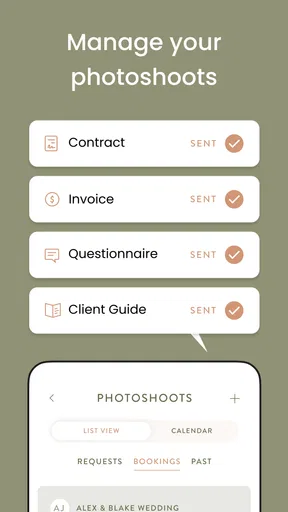
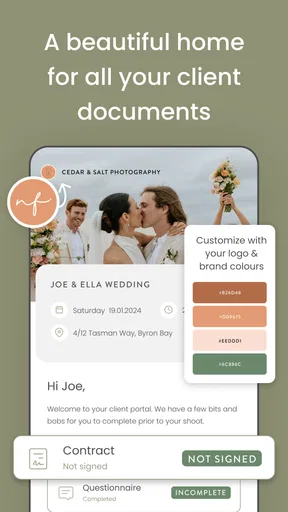
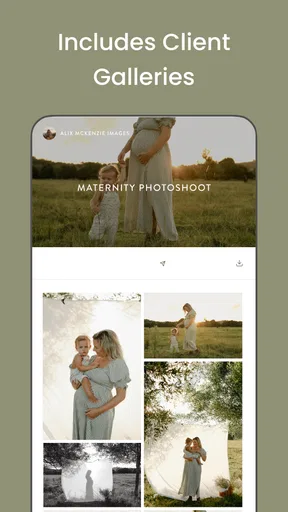
Our Review of Unscripted Photography Posing
 Analysis by Appyee
I tried Unscripted Photography Posing as a practical companion for planning and delivering portrait sessions, rather than treating it as just another camera app. That distinction matters. Its focus is not on replacing your phone’s camera or adding dramatic filters; it is built around the work that happens before, during, and after a shoot: finding pose ideas, keeping a session moving, sharing finished images, and handling some of the business tasks around photography.
That makes it an unusual fit in the photography category. If you mainly want manual camera controls, quick editing, or social-media effects, this is not aimed at the same problem. I found it more useful when I started with a real assignment in mind: a portrait session where I needed to avoid awkward pauses, guide someone who was not used to being photographed, and finish with a clean way to deliver the gallery. The app comes from Unscripted, is free to install, and is rated for Everyone, so the initial barrier to trying it is low.
The wider audience around it is also substantial, with over 500 thousand installs and a 4.3 average from around 1.9 thousand ratings. Those figures suggest that it has moved beyond being a niche experiment, but they do not change the most important question: whether its workflow matches the way you actually photograph people. My experience is that it can be genuinely helpful for portrait photographers, couples planning a shoot, and newer photographers who need structure. It is less convincing for someone looking for a complete professional studio-management system.
From an empty plan to a workable portrait session
I look at the gap between having a portrait idea and guiding a real person through it: this section considers how pose references, light planning, and delivery can turn an uncertain session into a workable sequence. The useful test is whether those tools help me stay present with the subject, which leads naturally to a closer look at the practical handoffs during a shoot.
Starting with the problem, not the pose
The most useful way to approach this app is to begin with the situation that usually causes trouble. Perhaps you have a client who says they are “not photogenic,” a friend who freezes as soon as the camera comes out, or a short outdoor session where you cannot afford to spend ten minutes inventing the next setup. In those cases, a blank camera app leaves the hardest part to you. Unscripted Posing gives you a place to prepare visual direction before the first frame.
I would not open it expecting a magic formula for every person. Posing is affected by height, clothing, mobility, confidence, location, and the relationship between the people being photographed. The app is better understood as a prompt library and session aid. It helps me move from “I need something different now” to “I have a direction I can explain and adapt.” That small change reduces the mental load of leading a shoot.
Before using any reference, I recommend deciding what the session needs to communicate. A relaxed couple session needs a different rhythm from a headshot appointment, and a family group requires different instructions from a solo editorial portrait. If I simply scroll through ideas without a plan, I risk collecting attractive images that do not belong together. The stronger workflow is to choose a visual mood, identify the subject’s comfort level, and then use the app to fill gaps in the sequence.
Building a sequence instead of copying isolated images
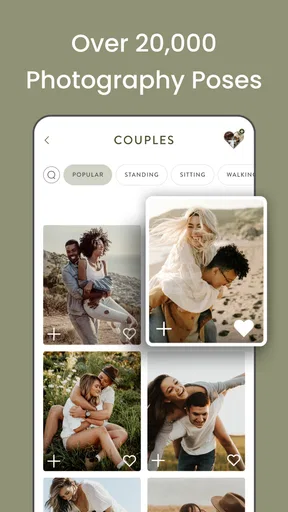
The posing material becomes more useful when treated as a progression. I might begin with an easy standing position, move into a walking or interaction prompt, and leave more precise or intimate directions until the subject has relaxed. This is one of the app’s practical strengths: it gives me something concrete to work from while still leaving room to adjust the language in my own voice.
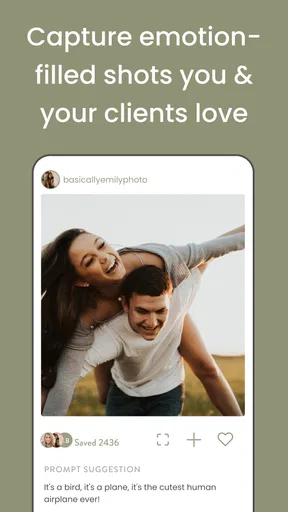
A common mistake is showing a reference and asking someone to reproduce it exactly. That can make a person more self-conscious, especially if the proportions, outfit, or surroundings differ. I get better results when I translate the idea into a simple action: turn the shoulders slightly, shift weight to one leg, look past me, or take a few steps and pause. The reference becomes a starting point rather than a rigid target.
For a short session, I would prepare a small mental set of directions rather than trying to use everything available. Too many choices create the same hesitation the app is meant to solve. A useful sequence might alternate between full-body, three-quarter, and closer compositions, while also changing the subject’s activity. That gives the final gallery variety without forcing a completely new concept for every photograph.
Using the sun tracker as a planning aid
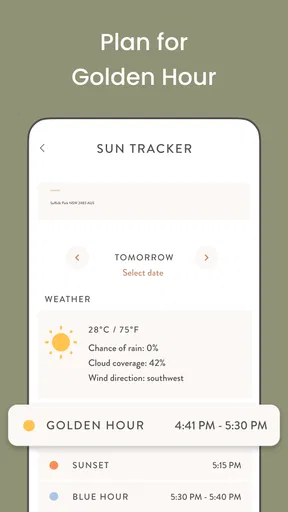
Outdoor portrait work often fails before the camera is raised because the light has not been considered. The sun-tracking part of the app adds value at this stage. I use it as a planning reference for deciding whether a location will offer front light, side light, backlight, or shade at the time of the appointment. It is not a substitute for visiting the place or watching the actual conditions, but it can help turn a vague location idea into a more deliberate plan.
The important trade-off is that sunlight direction does not tell the whole story. Buildings, trees, reflective walls, weather, and the subject’s ability to keep their eyes open can matter just as much. I would still leave room to change position when I arrive. The tracker is most useful when it prevents an obvious mistake, such as choosing a beautiful viewpoint that will put harsh light directly into the subject’s face during the planned time.
A less obvious benefit is how the light plan affects posing. If I know the light will come from one side, I can choose prompts that let the subject turn naturally into it rather than constantly correcting their face. That makes the session feel less technical. The posing guidance and sun information work best together: one helps decide what the person should do, while the other helps decide where and when they should do it.
Keeping the subject comfortable while the photographer stays organized
During a real shoot, I do not want to stare at my phone after every frame. The app is most effective when I check it between small groups of photographs, remember the next direction, and return my attention to the person. That approach keeps eye contact and conversation alive. If I use the screen as a teleprompter, the session can feel mechanical and the subject may start performing for the device instead of responding to me.
I also found that pose references are more valuable for inexperienced photographers than for people who already have a strong directing vocabulary. A beginner can use them to understand how a minor change in hands, posture, or gaze affects the image. An experienced photographer may use the same material as a quick reset when a familiar sequence has stopped producing fresh results. In both cases, the app works as a creative prompt, not as an automatic director.
One practical technique is to pair each pose idea with a reason. Instead of saying “stand like this,” I can explain that the movement is meant to create a longer line, show the clothing, or make the interaction feel less formal. People usually follow instructions more naturally when they understand the intention. This is the kind of benefit that does not appear in a short store description, but it is where a posing tool can improve the actual experience of a session.
Moving from the camera to the gallery
The workflow does not end when I capture the last frame. Unscripted Posing also addresses the handoff after a shoot by supporting gallery sending. That is important because delivery is often where a creative session becomes a client service. A photographer may have made strong images but still create friction if the recipient is unsure where to find them or what to do next.
I see the gallery function as most useful for keeping delivery connected to the session rather than treating it as a separate scramble across several services. After selecting and preparing the images, I can use the app’s delivery-oriented tools as part of the client handoff. The exact value depends on how much of my existing process I want to move into the app, but the concept is sensible: planning, shooting, and sharing are related stages of one job.
There is a workflow detail worth considering here. I would not promise a gallery immediately after pressing the shutter. Selection, editing, file organization, and client communication still require judgment. The app can help with the sending stage, but it does not remove the creative decisions that determine which images are worth delivering. For a photographer who already has a carefully refined gallery system, this may feel like an extra place to maintain rather than a complete replacement.
Handling the paid side of photography
The app’s store summary also points toward getting paid, which makes it relevant to photographers who are turning occasional sessions into a service. That does not mean it should be treated as a full accounting platform. I would use the business-oriented parts as support for a simple client workflow, while keeping careful records of agreements, expenses, deadlines, and tax obligations elsewhere if needed.
This distinction matters for someone just starting out. A beginner may appreciate having photography work and client delivery considered in the same environment, because it encourages them to think beyond taking pictures. At the same time, a professional with established invoicing, contracts, and bookkeeping may not want to rebuild those systems around a photography app. The best fit is likely someone who wants more structure but does not need a large, specialized business suite.
There are also in-app purchases ranging from around fifteen dollars to around three hundred fifty dollars per item. Since the app itself is free, I would begin with the accessible parts and only consider spending after testing whether the workflow actually saves me time. The higher end makes it especially important to understand what I would use repeatedly, rather than paying simply because a feature looks useful in theory.
Where the handoffs become fragile
Every handoff introduces a chance for confusion. The first is between the app’s reference and the subject’s body. A pose that looks effortless in a polished image may require careful coaching in a real location. The second is between the shoot and the gallery: the photographer still has to make selections and prepare the final work. The third is between delivery and payment, where expectations need to be clear even if the app helps organize the process.
I would also be cautious about relying on a single app for every stage of a professional job. A dedicated editing application may offer deeper image control, while a specialized client-management service may handle contracts, scheduling, and records more thoroughly. Unscripted Posing is attractive because it connects several photography tasks, but that convenience can come with less depth in each individual area.
Another point of friction is attention. A photographer who is constantly checking pose references, light information, and delivery tools can lose the human connection that makes portrait work successful. My solution would be to prepare before the appointment, use the phone sparingly during the session, and treat the app as a quiet assistant rather than the center of the interaction.
What the finished result feels like
When the workflow goes well, the result is not merely a larger number of poses. It is a session with fewer dead moments and clearer transitions. I can begin with directions that feel safe, introduce movement once the subject loosens up, and use the light plan to change position with purpose. The final gallery then has a better chance of feeling varied without becoming random.
For an everyday example, imagine photographing a friend outdoors after work. They arrive tired, the location has strong late light, and they immediately say they do not know what to do with their hands. I could use the app before meeting them to think through the light and select a few approachable prompts. During the shoot, I would turn those prompts into conversation and movement rather than displaying every reference. Afterward, the gallery tools give me a clearer route for sharing the finished set. The app does not take the photographs, but it helps connect the decisions around them.
That is where I think it delivers its strongest value: reducing the empty space between intention and execution. It gives a newer photographer a vocabulary for directing people and gives a busy photographer a way to keep planning details in one place. The improvement is practical rather than spectacular. A session may simply feel calmer, and that can show in the expressions and body language of the final images.
Who should use it, and who should skip it?
I would recommend trying it if you photograph people and regularly struggle with one of three things: running out of pose ideas, planning outdoor light, or organizing the path from finished images to the client. It is particularly suitable for beginners, portrait photographers building confidence, and casual photographers who want a more intentional session without learning a complicated production system.
I would be more hesitant to recommend it to someone whose main goal is advanced camera control or detailed editing. The app belongs to the planning and client-work side of photography, not the capture-and-retouch side. It is also not the obvious choice for a studio that already depends on separate tools for booking, contracts, invoices, proofing, and archival delivery. In that situation, adding another workflow may create more maintenance than benefit.
Couples and subjects can also find value in it, especially when they want to communicate the style of a shoot to a photographer. Still, a reference library cannot account for every personal boundary or physical limitation. I would always adapt directions respectfully and treat comfort as more important than matching an image. That is not a minor detail; forcing a pose because it appears in the app would undermine the very confidence the tool is supposed to support.
Device expectations, cost, and long-term usefulness
The current version is 4.10.2 and supports devices running Android 8.0 or later. That gives it a reasonably broad reach for people using older compatible phones, although the experience will still depend on screen size, storage, connection quality, and how comfortably you can consult the app outdoors. A small screen may be fine for quick prompts but less pleasant when browsing many visual references or managing a delivery workflow.
Because the download is free and the content rating is Everyone, I see little reason not to test it before deciding whether it belongs in a regular routine. The more important evaluation is not whether it contains many ideas, but whether those ideas change the way you direct people. If I still freeze during a session, or if I spend more time browsing than photographing, then the app is not solving the real problem.
I would judge its long-term usefulness by repetition. After several sessions, do I prepare faster? Do subjects receive clearer instructions? Do galleries move to clients with fewer awkward steps? If the answer is yes, the connected workflow can justify keeping it. If I only open it once to browse attractive poses, a simpler saved-reference folder may be enough.
My final take after following the whole workflow
Unscripted Photography Posing is best viewed as a bridge between creative preparation and practical delivery. It starts with the uncertainty of a portrait session, helps turn that uncertainty into directions and a light-aware plan, and continues into gallery sharing and the business side of getting paid. That connected approach is more useful than a basic pose collection, especially for photographers who are still developing their process.
Its limitations are equally clear. It will not replace a serious camera, an advanced editor, or a complete client-management platform. The references still need to be adapted, the photographer still needs to communicate well, and the delivery stages still require care. The in-app purchase range also means I would avoid committing money until I had tested the free experience against real sessions.
My recommendation is straightforward: try it if your biggest photography obstacle is directing people and keeping a portrait job organized from first idea to final gallery. Prepare a small sequence, combine it with the sun-tracking guidance for outdoor work, and use the prompts as conversation starters rather than instructions to copy. Its real strength is making the photographer’s workflow feel less improvised without taking away the human judgment that makes a portrait personal.
Verdict
Strengths of Unscripted Photography Posing
- Clear pose guidance helps beginners feel more confident during shoots.
- Useful prompts encourage natural movement instead of stiff, repetitive poses.
- Suitable for portraits, couples, weddings, and lifestyle photography sessions.
- Can help photographers direct clients more efficiently on location.
- Provides inspiration when you run out of posing ideas during a session.
Limitations of Unscripted Photography Posing
- Some pose suggestions may feel repetitive after frequent use.
- Examples may not suit every body type, outfit, or shooting environment.
- Beginners may still need practice to adapt poses naturally.
- Certain guidance can be difficult to follow without visual demonstrations.
- The app may be less useful for photographers with an established posing style.
Similar Picks in This Category
View All
Google Photos
Google LLC4.4

Gallery
Google LLC4.2

Picsart AI Photo Editor, Video
PicsArt, Inc.3.9

B612 AI Photo&Video Editor
SNOW Corporation4.1

BeautyPlus-Selfie Photo Editor
PIXOCIAL TECHNOLOGY (SINGAPORE) PTE. LTD.4.5

Remini - AI Photo Enhancer
Bending Spoons4.1
Frequently Asked Questions
What is Unscripted Photography Posing, and who is it designed for?
Unscripted Photography Posing is a posing and photography-planning app created to help photographers, models, couples, and content creators produce more natural-looking images. It offers pose inspiration, visual guidance, and practical ideas for different situations, including portraits, weddings, couples, fashion, and lifestyle sessions. It can be useful for beginners who need direction as well as experienced photographers looking for fresh concepts.
Does the app provide pose ideas for different types of photography sessions?
Yes, the app is intended to cover a broad range of photography scenarios rather than focusing on only one style. Depending on the available content and your selected categories, you can find inspiration for individual portraits, couples, groups, weddings, fashion shoots, and other common sessions. The examples are especially helpful when a subject feels uncomfortable or you need to quickly create variety during a shoot.
Can Unscripted Photography Posing be used by beginners without professional photography experience?
Beginners can use the app because its main purpose is to make posing easier to understand and apply in real situations. Instead of relying only on technical photography terminology, the visual references help you see how a person can stand, sit, move, or interact with another subject. However, the app does not replace learning camera settings, lighting, composition, or communication skills.
Is Unscripted Photography Posing free to download, and are there paid features?
The app may be available to download at no initial cost, but some content, tools, or categories can require a subscription or in-app purchase depending on the current version and platform. Before confirming a purchase, review the pricing, billing period, trial conditions, and cancellation rules shown in the App Store or Google Play. Availability and prices may also differ between Android and iOS.
Does the app work offline during a photography session?
Offline access can depend on which version of the app you use and whether the relevant pose references have already been loaded or saved. It is best to open the application before leaving for a session, check that your chosen categories are available, and download or save any permitted material in advance. If the app requires an internet connection, mobile data or Wi-Fi may be needed on location.
